Create a token grant template
Last updated: June 10, 2025
Overview
If you want to import token grants using our bulk upload template, you will need to first build your token grant templates within your Liquifi account.
What is a Token Grant Template?
A Token Grant Template at Liquifi is a predefined structure used to streamline the creation and management of token grants. It includes standardized parameter-based settings such as vesting/unlock schedules, cliffs, and durations as well as custom-defined sets of dates and percentages. Templates help ensure consistency, reduce manual errors, and save time when uploading and issuing grants to employees, contributors, or stakeholders.
Looking for template setup samples? Click here.
Step 1. Define your token grant template parameters
Before you build a token grant template, you should review the vesting and/or lockup clause in your executed legal documents for your stakeholders to determine:
Whether vesting and/or lockup schedules apply
Whether linear or custom schedules are required
The parameters of the vesting and/or lockup schedules
Here is a summary of the required parameters for building out vesting and lockup schedules:
Vesting Schedule Parameters:
Vesting Type
Choose between Linear vesting (tokens vest gradually at a regular cadence) or Custom vesting (tokens vest based on a non-linear schedule with non-linear token amounts)Linear Vesting Parameters
Vesting Cliff
An optional initial period before any tokens vest. You can specify a percentage that vests at the cliff and its duration.Vesting Schedule Length
Specifies the full duration of the vesting period including any cliff periodVesting Frequency
Specifies how often tokens vest after the cliff (e.g., every month)Vesting Occurrence Date
Specifies what day of the month each vest event's tokens should vest on. We currently support:
Start of the month
End of the month
Same day as the start date (most common)
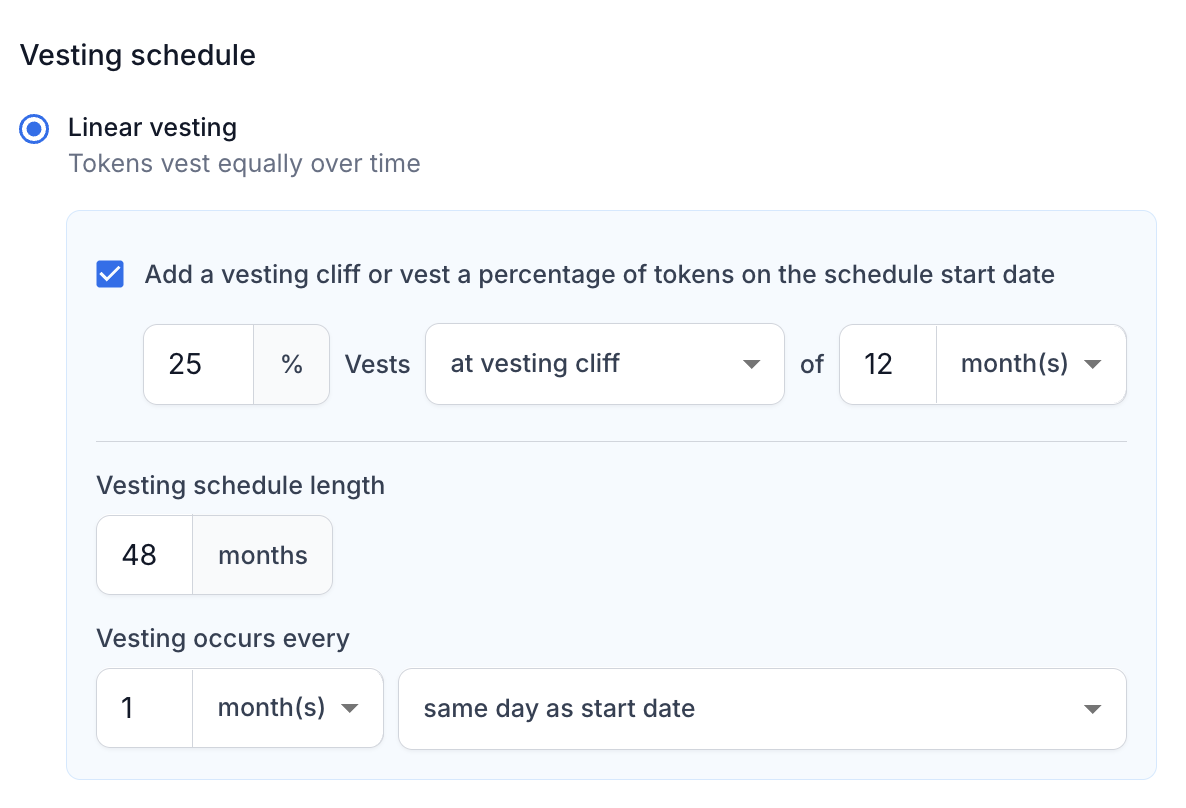
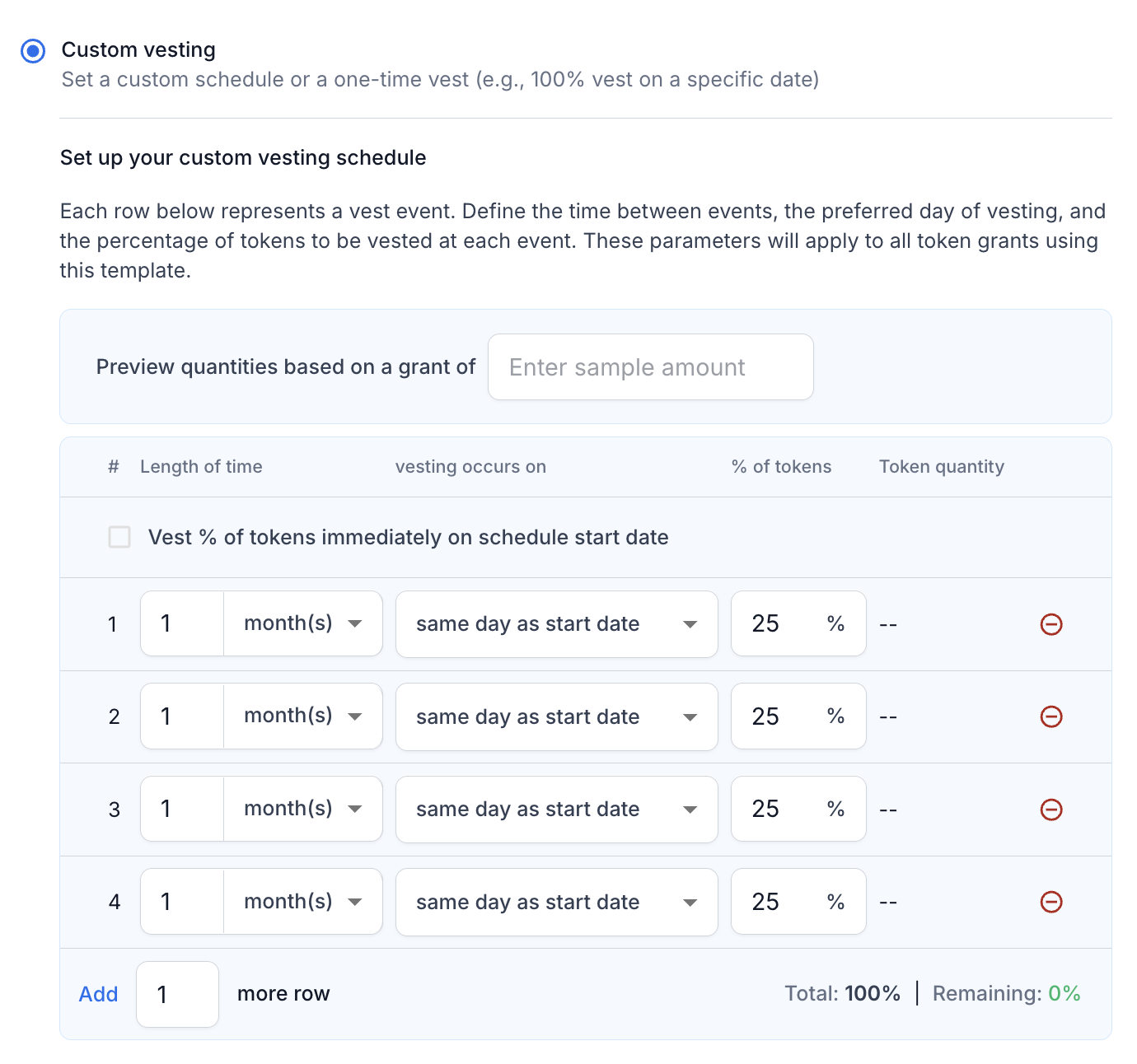
Custom Vesting Parameters
For custom vesting, you should build a table of time frequencies and corresponding percentages of tokens to map into Liquifi.
Lockup Schedule Parameters
Linear Lockup Parameters
Lockup Type
Choose between a Linear lockup (tokens unlock gradually) or a Custom lockup (tokens unlock all at once or per your custom schedule).Lockup Cliff
An optional initial period before any tokens unlock. You can specify a percentage that unlocks at the cliff and its duration.Lockup Schedule Length
Total duration of the lockup period.Unlock Frequency
How often tokens unlock after the cliff (e.g., every 3 months).Unlock Start Alignment
Specifies whether unlocks align with the grant start date or are on calendar-based intervals.
Custom Unlock Parameters
For custom vesting, you should build a table of time frequencies and corresponding percentages of tokens to map into Liquifi.
Step 2: Build out your templates within your Liquifi account
The below example walks through the steps to set up an industry-standard 48-month vesting schedule with a 25% 12-month cliff and a 36-month unlock schedule with a 33.33% 12-month cliff. Click here for a video walkthrough.
Access Token Grants
Open the platform and navigate to the Token Grants section.
Create a New Template
Go to Templates.
Click on Create New > Token Grant Template.
Define a template name
We advise referencing the relevant stakeholder group (e.g., Investors) and/or a summary of the structure (e.g., 4 Year Unlock - 25% Cliff).
Select the Schedule type.
Choose Vesting and lockup.
Define the Linear vesting parameters.
Add a vesting cliff of 25% for 12 months.
Set the total grant length to 48 months.
Set the vesting occurrence to every 1 month.
Define the Linear lockup parameters.
Add a vesting cliff of 33.33% for 12 months.
Set the total grant length to 36 months.
Set the vesting occurrence to every 1 month.
Create the template to add the template to your library.
Once created, copy the template to use in your upload sheet.
Looking for template setup samples? Click here.
Step 3: Use the template ID to bulk import your token grants
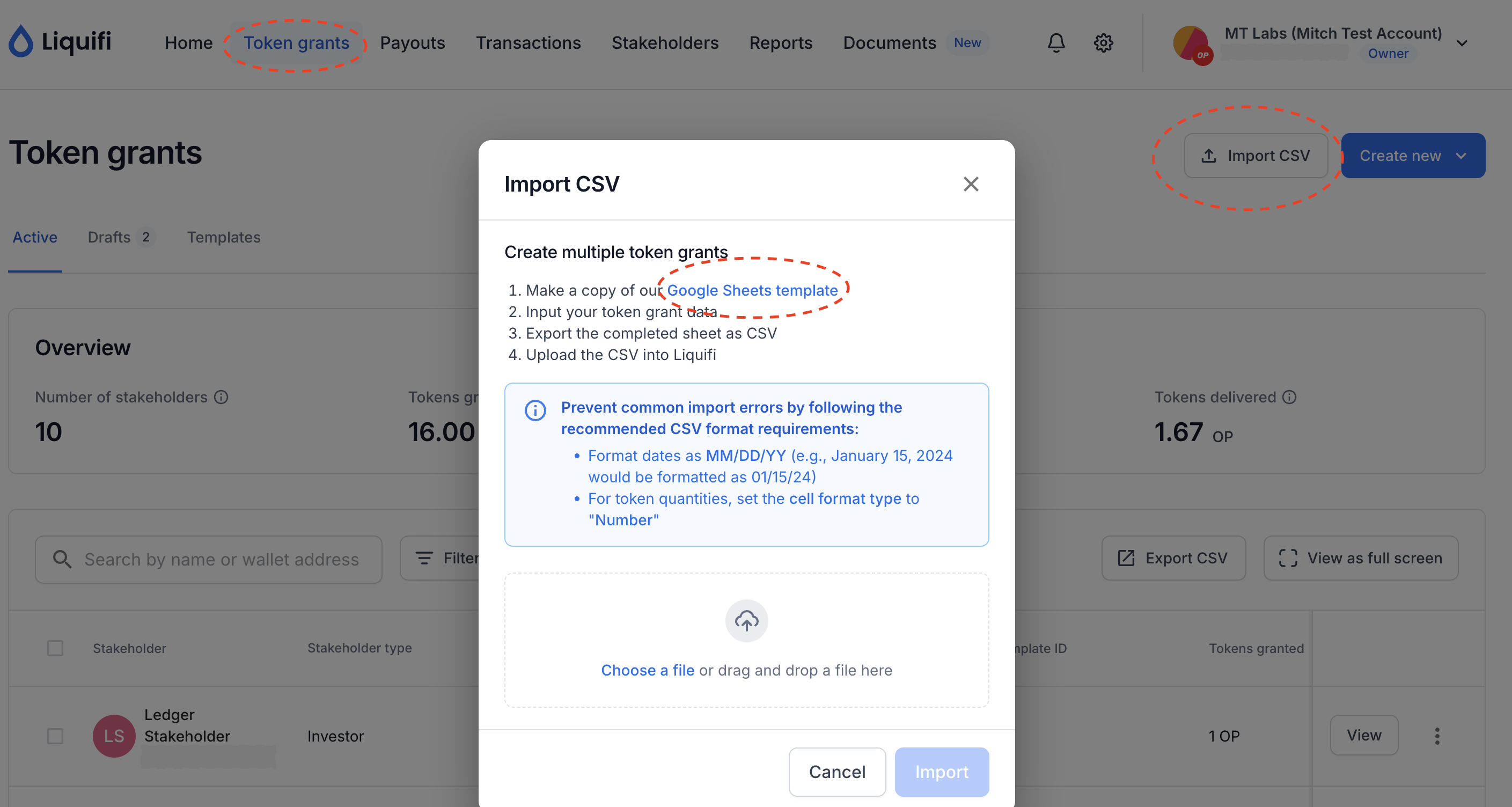
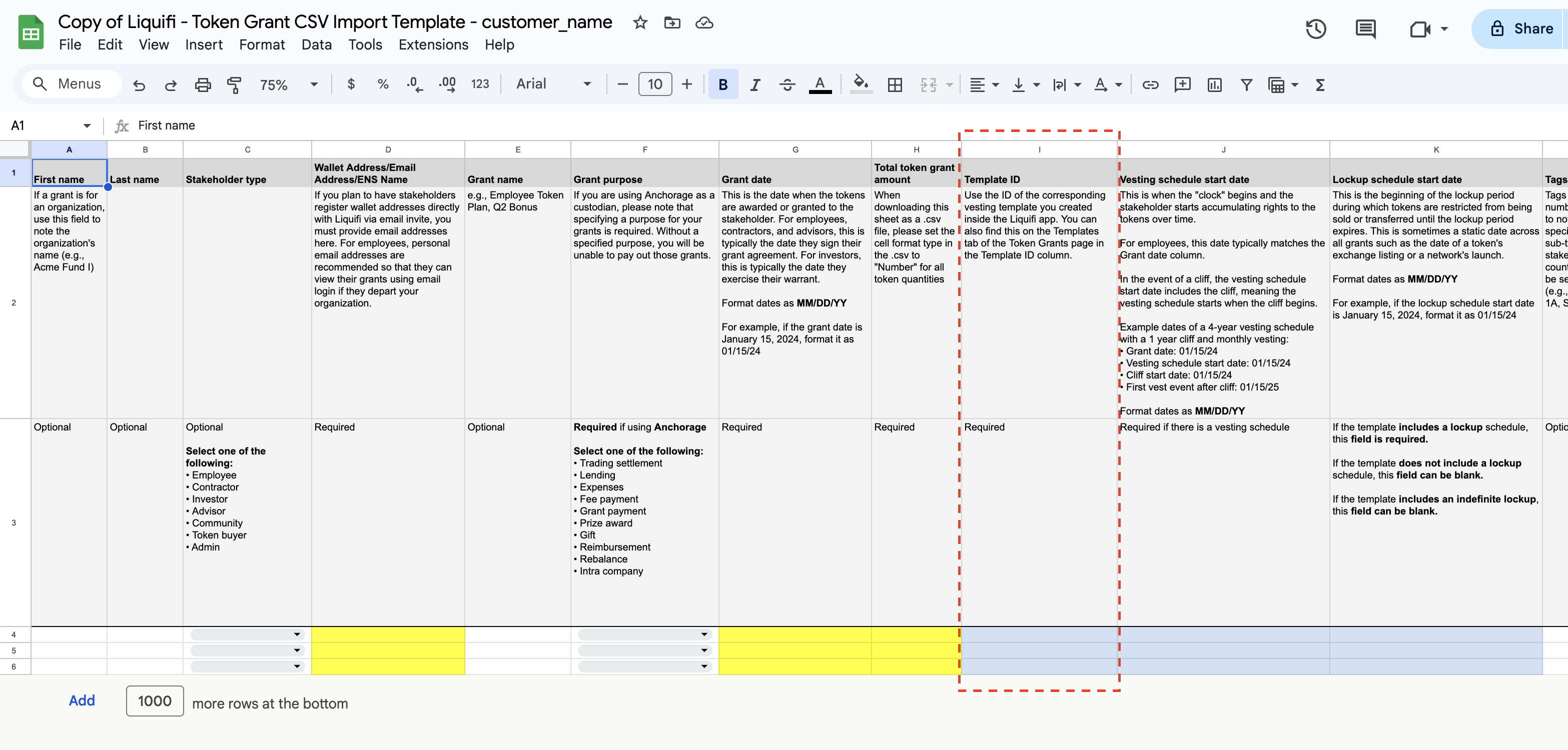
After completing Step 2, you can use the generated Template ID to bulk import your token grants using this Google Sheets template (also available in the Liquifi platform as shown below). Please note that you must have existing stakeholder profiles for all grants before uploading token grants.
You'll set the corresponding template ID in column I "Template ID" for each relevant row of data.
You can also create a one-off grant within the Liquifi platform and apply the relevant template, as shown below.
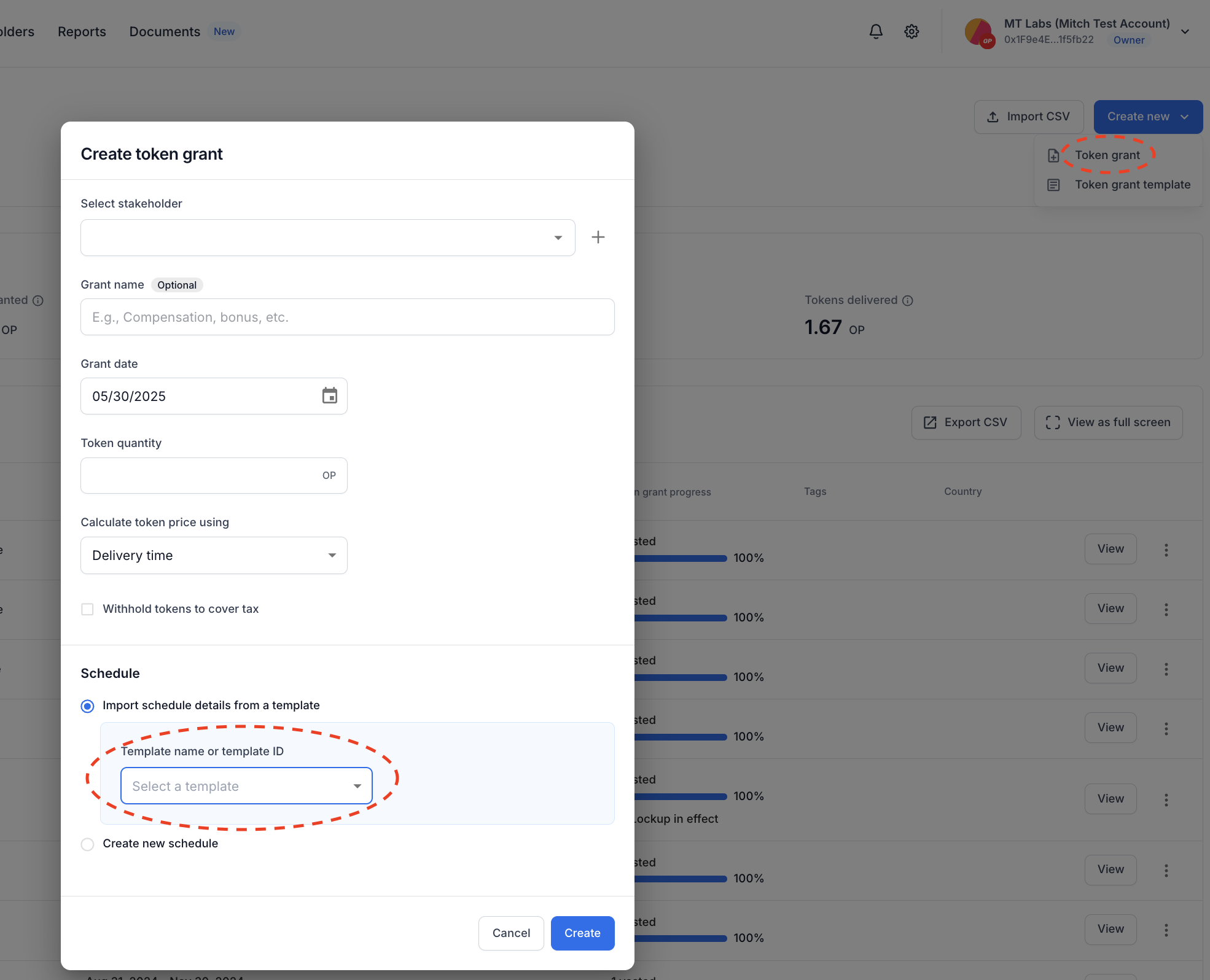
Sample Use Cases for Token Grant Templates
Time-based vesting/unlock grants:
Restricted token award
Token purchase
Employee onboarding bonus
Investor token warrant execution
Advisor compensation
Bounty program reward
Contributor grants (DAO or community projects)
Ecosystem partnership incentive
Key Opinion Leader (KOL) grant
Token allocation for Board Member or Executive
Employee retention grants
One-time transfer grants:
Token mint-related transfers
Spot token bonuses
Digital asset vendor payments
If you need immediate assistance, please contact our support team directly at support@liquifi.finance
If you don't see what you're looking for in our support documentation, you can request a resource to be made by our support team using this form.