Complete a test transaction (using a Coinbase Prime account)
Last updated: October 8, 2024
As a final step prior to your first token payouts, we strongly advise completing an end-to-end test transaction in your Liquifi account to confirm your Coinbase Prime integration is working as expected. To do so, please complete the following steps:
Step 1: Add an address as a trusted address in Coinbase Prime
To complete a test transaction, you must first add a recipient address as a Trusted Address in your Coinbase Prime account. Here is our guide on how to complete that setup.
Step 2: Create and publish a token grant for the trusted address
After adding the address as a Trusted Address in your Coinbase Prime account, create a new token grant for that Trusted Address in Liquifi with the following parameters:
Token quantity: Coinbase Prime requires a minimum transfer amount that differs by asset. Please review their documentation on withdrawal minimums for more information.
Vest schedule type:
CustomNumber of vest events:
1Percentage:
100
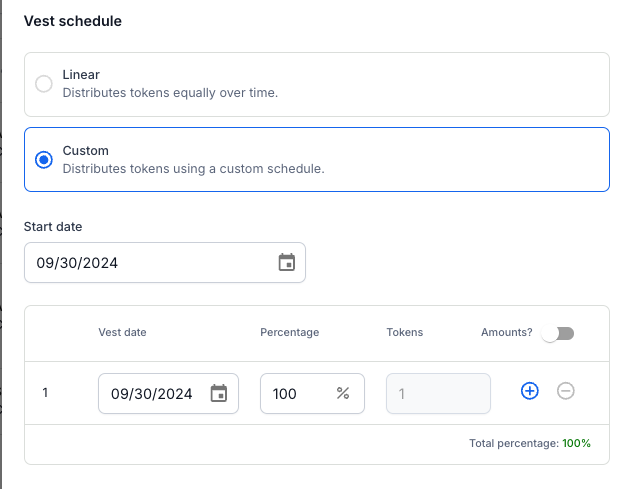
Once the grant is your drafts, publish the grant so that you can process the payout.
Optional: Tag the grant with
Test Transactionfor recordkeeping clarity.
Complete the remaining standard payout steps for Coinbase Prime noted here.
Request confirmation directly from the stakeholder that they received the test transaction amount in the expected wallet.
Once the stakeholder confirms receipt of the test transaction, manually mark the wallet as
verified.
If you need immediate assistance, please contact our support team directly at support@liquifi.finance
If you don't see what you're looking for in our support documentation, you can request a resource to be made by our support team using this form.