Pay out tokens (using a Coinbase Prime account)
Last updated: September 30, 2024
Completing a test transaction? Coinbase Prime requires a minimum transfer amount that differs by asset. Please review their documentation on withdrawal minimums for more information.
The following steps are required to pay out tokens using your Coinbase Prime custody integration with Liquifi:
Confirm the following in your Coinbase Prime account:
Ensure you have sufficient approvers on standby for your Coinbase Prime account to complete token transfers.
Ensure you have sufficient tokens in your Trading balance to cover your payouts.
Log in to Liquifi via https://app.liquifi.finance/
Add any new wallet addresses as trusted addresses that have not already been added.
Any addresses that are not allowlisted as a Trusted Address in your Coinbase Prime account will be excluded from your Liquifi payouts. You will see a yellow warning banner in the Liquifi payouts page if any addresses have been excluded for this reason.
Submit payouts via Liquifi.
Navigate to your Pending activity in Coinbase.
Wait for your payouts from Liquifi to load into your Pending activity queue in Coinbase.
Bulk approve the payouts in batches of 20.
Select the first 10 payouts in first page of pending transactions.
Navigate to the next page.
Select the next 10 payouts.
Approve the payouts.
Complete your approval process with your Yubikey.
Continue this process until you've approved all payouts.
Completing more than 100 payouts? Coinbase Prime has a limit of 100 visible transactions in the Pending activity queue of your Coinbase Prime account. After approving the transactions, they will need to be processed on-chain before any remaining payouts (those after the first 100) become visible in your queue.
Here are the additional steps to take for 100+ payouts:
1. Approve the first 100 payouts in Coinbase.
2. Wait for the first 100 to process (typically takes 5-10 minutes).
3. Wait for the remaining payouts from LIquifi to show in your pending activity queue (typically takes 5-10 minutes).
4. Approve remaining payouts in batches of 20.
FAQs
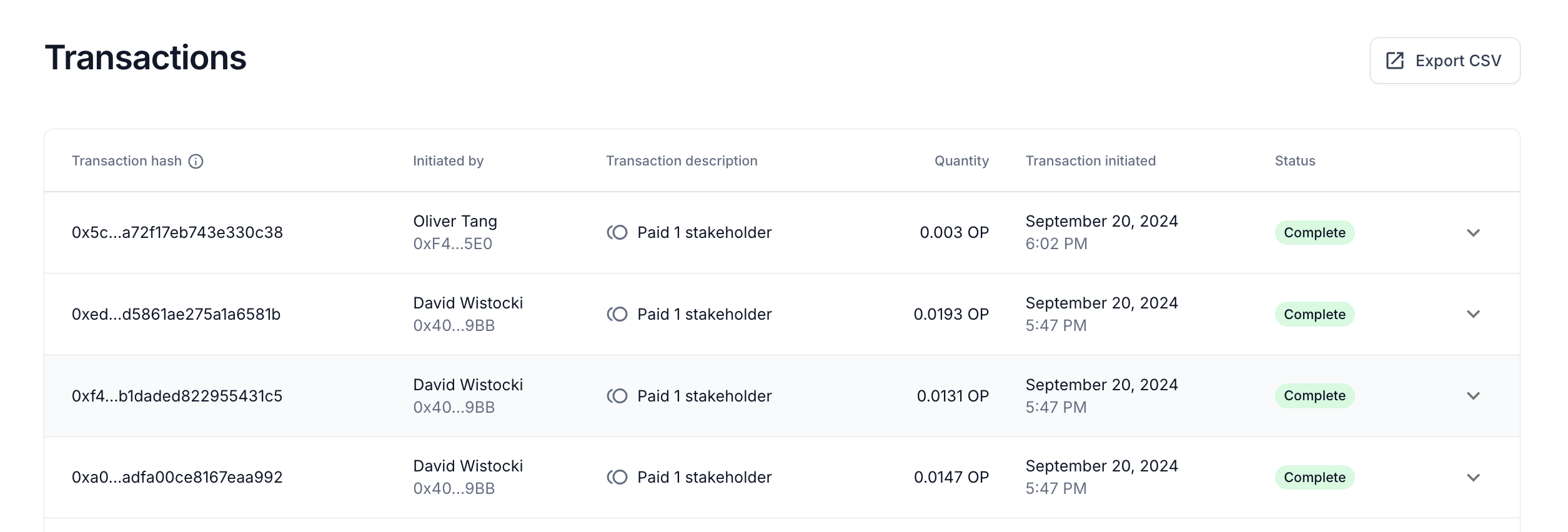
How will my Coinbase Prime payouts be displayed in my Liquifi account transactions page?
Coinbase provides a transaction hash for each payout that occurs. Because of that functionality, you will see a single transaction per payout:
If you need immediate assistance, please contact our support team directly at support@liquifi.finance
If you don't see what you're looking for in our support documentation, you can request a resource to be made by our support team using this form.